Scratch Emulator - Interactive Code Sandbox Online
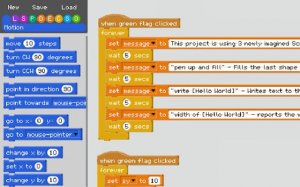
💡Scratch Emulator excels as an educational tool, offering a unique project-in-project feature that demystifies complex coding concepts. The custom block creation is intuitive, and the safe, browser-based environment encourages experimentation. Perfect for beginners and hobbyists seeking hands-on learning.
Description
Game Introduction: Scratch Emulator offers a unique and engaging simulation experience that brings creative coding concepts to life. This interactive sandbox allows you to run and control projects in a layered environment, providing a hands-on approach to understanding programming logic and project flow. The core feature is its innovative project-in-project system, where clicking the green flag starts a nested simulation. This makes abstract programming concepts tangible and easy to grasp. It is designed as a safe, educational space for beginners and experienced users alike to prototype logic, simulate interactions, and test project structures visually.
How to Play: Start by clicking the prominent green flag to initiate the project-in-project simulation. This runs a project within the current project, creating a dynamic nested environment. Click the flag again to stop the simulation and regain control. To create custom blocks, use the intuitive bracket-based syntax: enclose string inputs in [square brackets], number inputs in (round brackets), and boolean inputs in {curly brackets}. The text inside becomes the input label, making your blocks clear and functional. Experiment with different inputs to see how code interacts in real time.
Game Features: Safe educational sandbox, project-in-project simulation, custom block creation with simple syntax, visual learning of programming logic.
Game Conclusion: Scratch Emulator is more than an emulator; it is a gateway to creative programming exploration and logical discovery, all within your browser.
You might like these games.
Play wonderful games that are perfect for your entertainment and relaxation.